Combinatorial ads
Alert
Starting July 14, existing Text & Image ads will begin upgrading to combinatorial ads. For more information, see Upgrading Text & Image ads to combinatorial ads.
Combinatorial ads are an ad type where you provide multiple titles, texts, images, and videos, and Yandex Direct generates multiple banners.
Combinatorial ads help you manage ads more efficiently:
-
This ad type helps you set up Text & Image ads easier and faster.
Rather than creating many separate ads with different messages, you only need to add as many element variations as possible to a single ad. The system will automatically generate banners from these elements, and Yandex Advertising AI will select the most effective option for each impression.
-
With this ad type, you can expand your reach and improve conversion rates.
The more versions of texts, titles, images, and videos you add to your ad, the more effectively Yandex Direct can identify the best combinations for different audiences and ad platforms. This expands your reach and helps you get more conversions.
-
These ads adapt to specific ad platforms.
By uploading multiple images and videos in different aspect ratios, you enable each platform to display the most suitable creatives in the right aspect ratios.
How it works
-
Adding elements. Add multiple title, text, image, and video options to your ad.
-
Creating combinations. The system automatically creates various combinations of elements and builds ready-to-run ads from them.
-
Optimizing impressions. Yandex Advertising AI evaluates each combination in real time and selects the most suitable one for every impression.
How to configure
-
In your unified performance campaign, select the Combinatorial ad type.
You can add up to 3 non-archived combinatorial ads per group, and up to 10 ads of this type per group, including archived ones.
-
Enter the link to the promoted page or select a landing page. The site must match the ad text and comply with Yandex policies.
-
Add up to 7 titles and up to 3 ad texts manually or using the Generate titles and ad texts feature. Review our recommendations for writing ads.
Tip
Add as many titles and ad texts as possible, and make sure they're varied. Yandex Direct will select the right audience for each ad variant, helping you engage more potential customers. To make your titles and ad texts more effective, use Personalization.
-
Upload up to 5 images. In the preview section, you can evaluate different aspect ratios and adjust smart centers for each image if needed.
Tip
When uploading images and videos, use file names that are clear to you. That way, it'll be easier to work with reports.
Use the AI creative editor to generate and edit an image based on your text description.
-
Add up to 6 videos. With the AI creative editor, you can transform images into videos.
Tip
Upload as many videos as possible to better showcase your product or service and improve conversion rates. Experiments show that, on average, ads with videos reach 7% more target users. Upload videos in various aspect ratios (for example, 16 : 9, 4 : 5, 1 : 1). This way, Yandex Direct will choose the best format for each ad platform and device, maximizing your reach.
The more titles, ad texts, images, and videos you add, the more banners Yandex Direct generates and the more users you can reach.
-
Add an image carousel to give customers a multi-angle look at your product or service, walk them through its creation process, and showcase its unique features or benefits. You can add between 2 and 10 images to your ad in the specified order.
-
Set up an action button. It draws attention and encourages user engagement. The button adds one more link to ads with an image or video.
-
Double-check the company's contact details.
-
For ads served in the product gallery, make sure to indicate the price.
-
Describe the advantages and benefits of your offer using callouts.
-
Use Sitelinks to provide shortcuts to important information on your site.
Complete all ad elements. Yandex Direct uses them in different design options for creatives, including the various layouts that appear in search results.
As an advertising data operator, Yandex assigns each creative a unique identifier (token) when creating campaigns. It uses this token to aggregate all your placement data and send it to the Unified Register of Online Advertising (ERIR). Learn more about ad labeling.
Note
Combinatorial ads are available in Direct Commander and through the Yandex Direct API. You can also manage your settings using XLS and XLSX files.
How to evaluate results
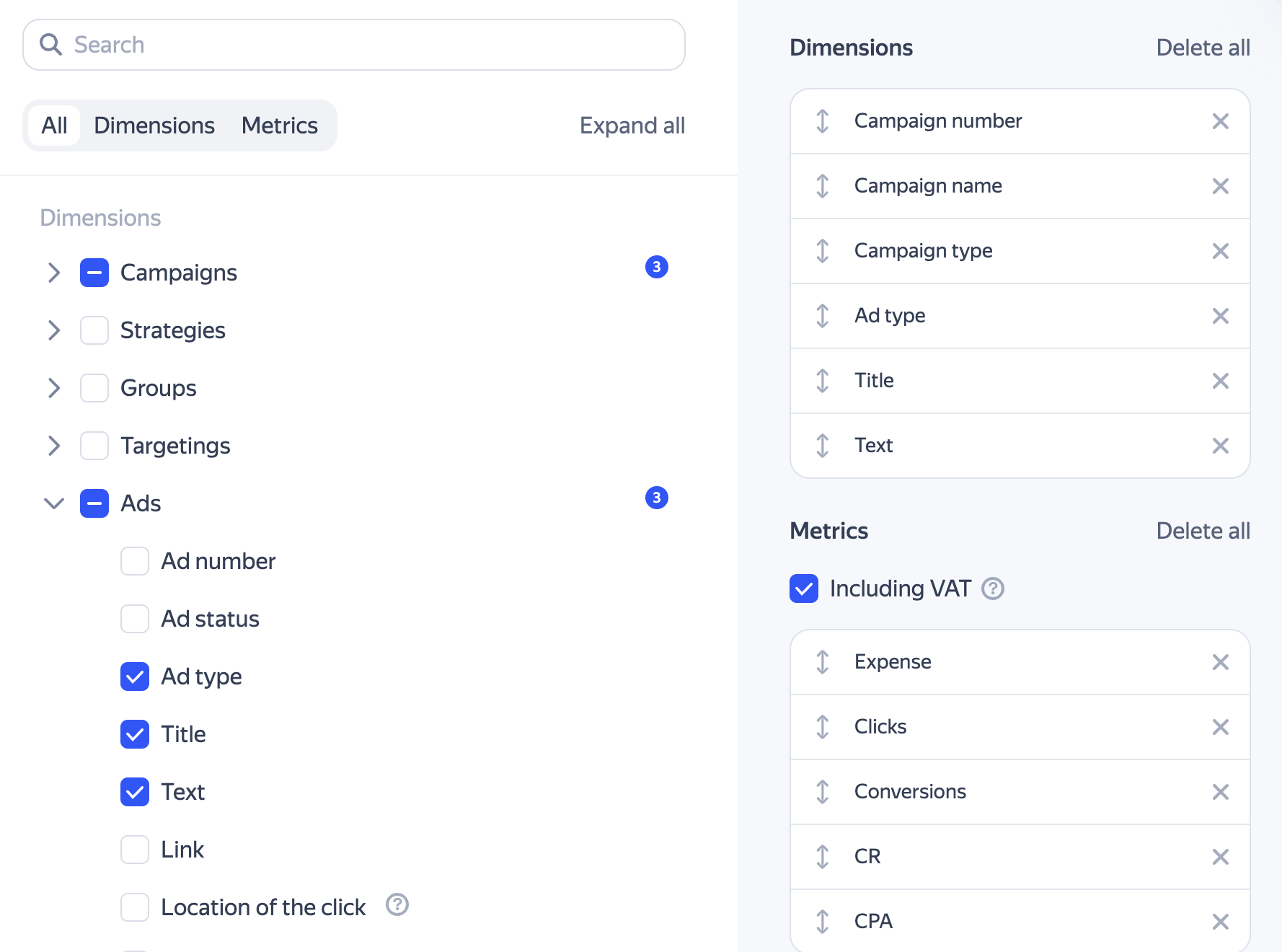
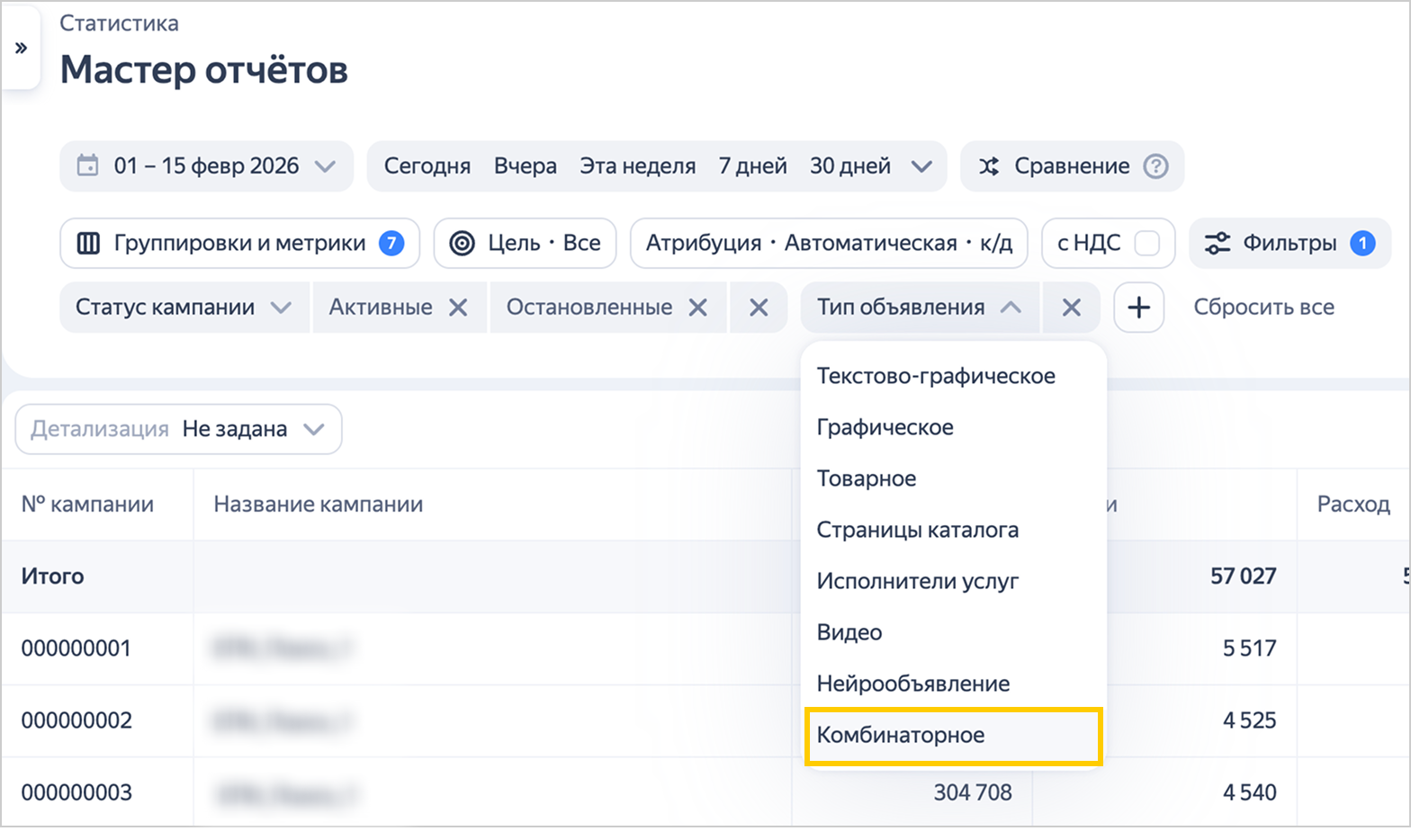
You can evaluate the performance of your combinatorial ads using the Ad type dimension in the Report Wizard.
For a deeper analysis of element combinations, use additional dimensions: Title, Text, Image, Image name, Video preview, Video ID.
To include only combinatorial ads in the report, specify this ad type in the filter settings.
Ad moderation and launching a campaign
Once created, your ad will be reviewed for compliance with our requirements. Click Submit for review and accept the terms of the Offer that regulates how Yandex serves your ads. Moderators usually review an ad within a few hours. On weekends and holidays, moderation may take longer than on weekdays.
Your moderation results will be emailed to the address you provided when you created the campaign.
Once your ads pass the review, you'll receive a notification at the email address you provided when you created the campaign. The campaign status in the list will change to "accepted by moderator".
Your ads will start running as soon as Yandex processes your payment.
Setting up ads for promoting products on marketplaces
If you promote your stores on Yandex Market and Ozon:
-
Create a product ad. Select “Products from the marketplace” as the source and provide a link to your store or product on Yandex Market or Ozon. Yandex Direct automatically creates a feed. You can find it under Feeds.
-
Use filters to select the products you want to promote. For Yandex Market, you can filter products by category, name, description, manufacturer, price, and price before discount. For Ozon, you can filter them by name, description, price, and price before discount.
-
Create combinatorial or image ads by providing links to your store or a product on a marketplace.
-
Please note that ads for catalog pages won't work for sales on marketplaces.
Have questions?
Alert
Our customer support can only assist you with campaigns linked to the username you are contacting us from. You can check your username by opening ya.ru in another browser tab. Our team can access your data only when processing your request.
Scan the QR code or tap it to follow the link.


If you select Telegram or WhatsApp, keep in mind that Yandex does not control and is not liable for how third-party messengers store your data and chat history.