Compare periods
In reports, you can view data for two periods at the same time. To do this, click Comparison and select a preset period or specify your own. Reports are saved with these settings. For example, you can create and save a week-over-week comparison report and access it from My reports whenever you need.
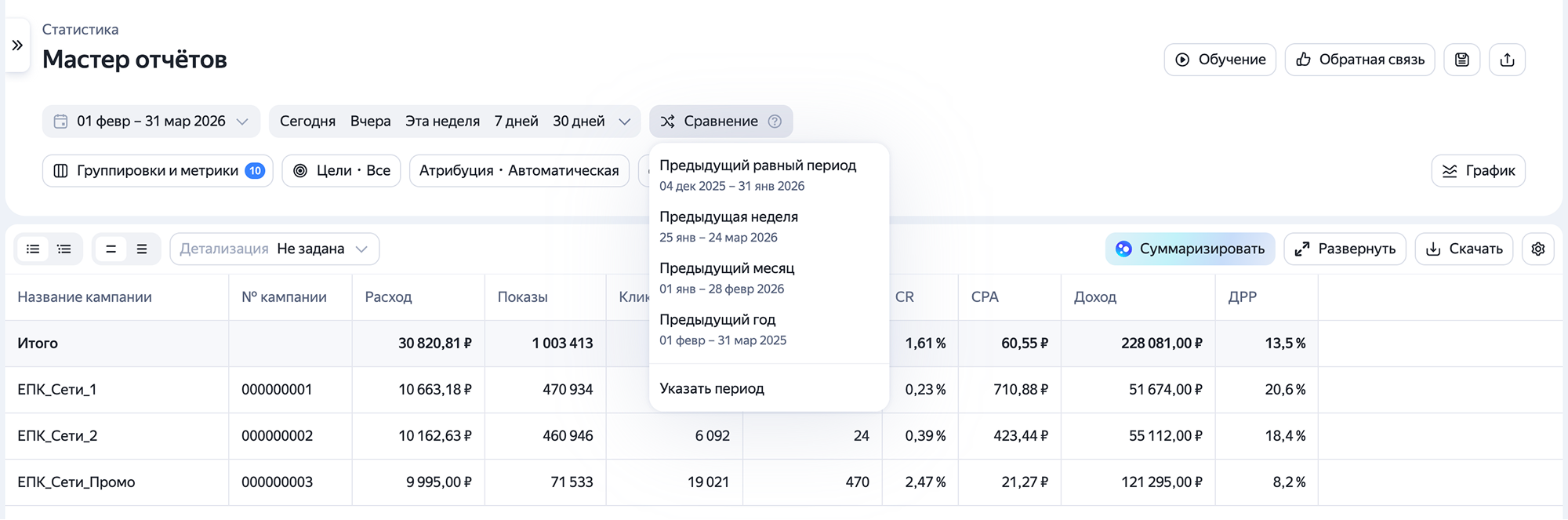
By default, you can compare these periods:
-
Last equal period
-
Last week
-
Last month
-
Last year
When configuring comparison periods, you can choose custom intervals without restrictions on date overlaps or chronological order. If needed, you can swap  comparison periods with a single click.
Tip
If you're working with large datasets, pin a column so it remains visible while you scroll horizontally through the report.
Watch video
Have questions?
Alert
Our customer support can only assist you with campaigns linked to the username you are contacting us from. You can check your username by opening ya.ru in another browser tab. Our team can access your data only when processing your request.
Scan the QR code or tap it to follow the link.


If you select Telegram or WhatsApp, keep in mind that Yandex does not control and is not liable for how third-party messengers store your data and chat history.