Using the segments in Yandex Direct
Yandex Audience segments become available in Yandex Direct immediately after they receive “Finished” status.
Impression criteria via Yandex Audience
You can set up your ad networks impression criteria for an ad group on the page where you create or edit ad groups by setting up Retargeting & Audiences or User profile. Use Yandex Audience segments when setting up criteria:
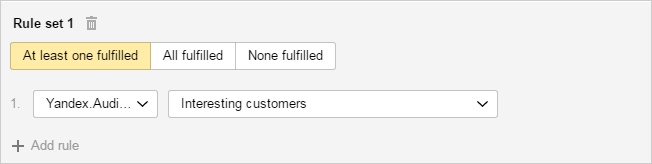
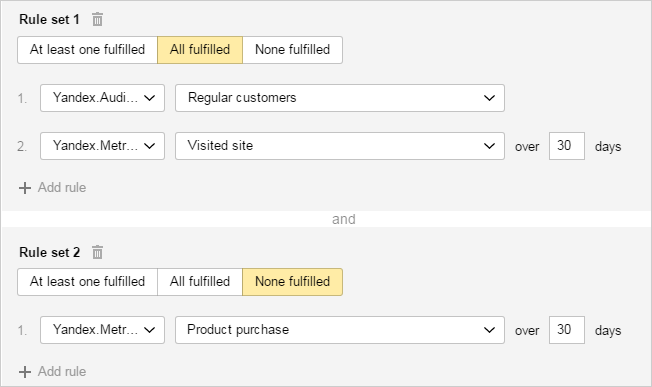
You can set up complex impression criteria which include Yandex Audience segments and Yandex Metrica targets/segments. For example, if you want to use a Yandex Audience segment to select the users who visited your site in the last 30 days but didn't purchase anything, set up two criteria:
More on setting up Retargeting & Audiences and User profile.
Bid adjusments
You can use bid adjustments to increase or decrease the CPC for Yandex Direct ads for a particular audience, for example, the audience that matches the Yandex Audience segment. This setting is available in the block Bid adjustments on the campaign parameter page or the ad group editing page.
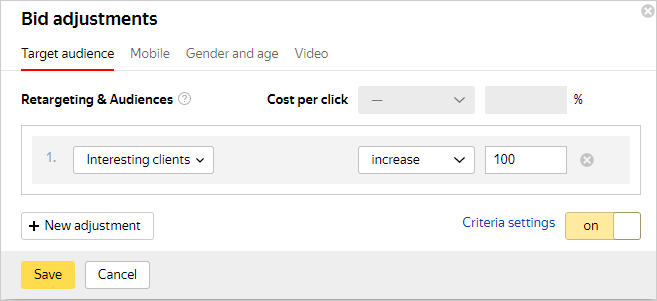
More on Bid adjustments.
Statistics
Statistics for impressions and clicks on ads that use Retargeting & Audiences or User profile criteria are available in the Report Wizard. On the My campaigns page, follow the Statistics for all campaigns link and click the Report Wizard tab. Set the period, then select Impression criteria in the Slices block. Add the filter Impression criteria type → Retargeting & Audiences or Impression criteria type → User profile.
More on the Report Wizard.
Still have questions?
Alert
Customer support agents can only assist you with campaigns associated with your username. You can see your current username it in the upper-right corner of the screen. The agent will get access to your data only when processing your request.
Message in WhatsApp