Segment based on your own data
Select the data you want to upload:
-
CRM data: Email addresses and mobile phone numbers.
-
Mobile device IDs: Mobile device IDFA/GAID.
File requirements: the file must include at least 100 data strings and meet the format. Use SHA-256 hashing to protect your data.
Warning
Starting January 2025, uploading new MD5 hashes is no longer supported. To upload new data, use SHA‑256.
CRM data
Upload customer contact data from your CRM (email, phone, and other IDs) to create a segment in Yandex Audience.
The file must have at least 100 data strings and meet the file requirements.
How to create a segment
- Click Create segment → CRM data.
- Upload your file and name the segment.
- Select SHA-256 if the data is hashed.
- Accept the Yandex Audience Terms of Service and the Data Processing Agreement.
- Click Create segment and wait for the system to process it.
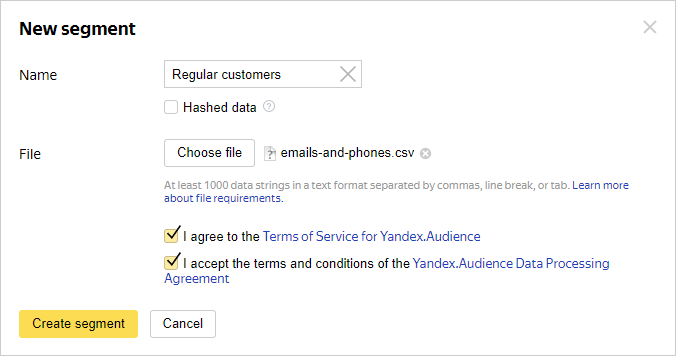
If coverage is at least 100 anonymous IDs, the segment status becomes Finished — you can then use it to set up your ads.
Mobile device IDs
Uploading mobile device IDs (IDFA/GAID) for ad targeting.
The file must have at least 100 data strings and meet the file requirements.
Attribution mode
- Cross-Device: The segment includes other devices associated with the uploaded ID and belonging to the same user.
- In‑Device: The segment includes only the uploaded devices, without expanding to other devices.
How to create a segment
- Click Create segment → Mobile device IDs.
- Upload the file with IDs and name the segment.
- Select Cross-Device or In-Device mode.
- Select SHA-256 if the data is hashed.
- Accept the Yandex Audience Terms of Service and the Data Processing Agreement.
- Click Create segment and wait for the system to process it.
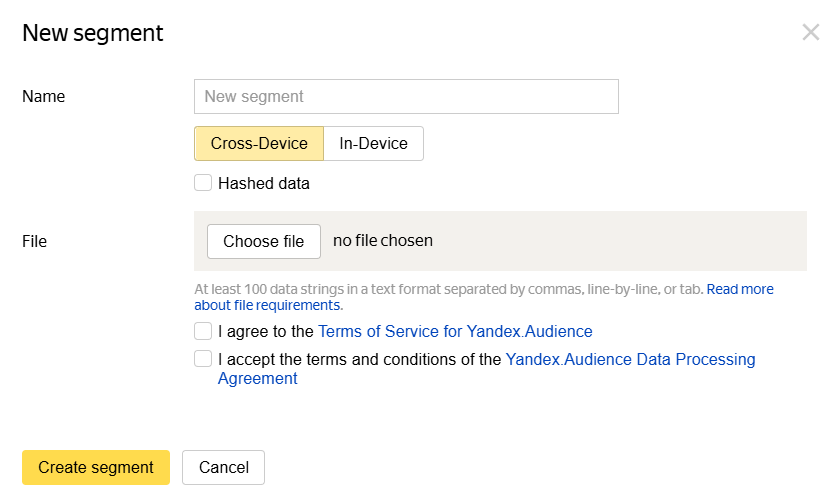
If coverage is at least 100 anonymous IDs, the segment status becomes Finished — you can then use it to set up your ads.
Learn more
Still have questions?
Alert
Customer support agents can only assist you with campaigns associated with your username. You can see your current username it in the upper-right corner of the screen. The agent will get access to your data only when processing your request.
Message in WhatsApp