Exporting experiment data
You can export unaggregated experiment data using the Yandex Metrica Logs API.
Note
Only available in the Varioqub extended version.
In addition to the standard fields available in the Logs API, you can export a list of experiment variant IDs. Variants are linked to the sessions of sampled users. To export this data, use the following field:
|
Field |
Data type |
Description |
|
ym:s:testids |
Array(Integer) |
Array of IDs. |
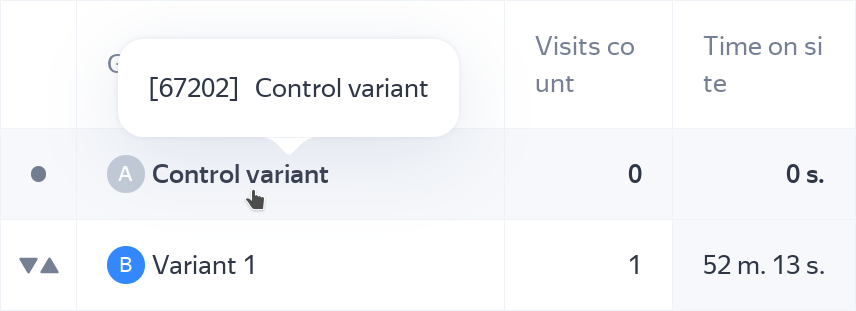
You can view the ID in your Varioqub report.
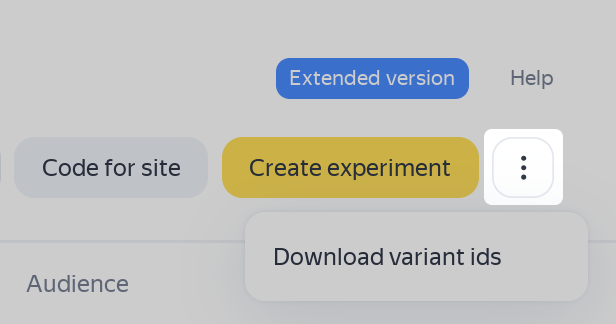
You can also get a list of experiment variant IDs and names in Yandex Metrica:
- Go to Varioqub → Experiments.
- In the upper-right corner of the page, click on the three dots.
Yandex Cloud integration
Note
Only available in the Varioqub extended version.
Using the Yandex Metrica connector, you can collect non-aggregated data in your Clickhouse cluster hosted on Yandex Cloud.
The data format of this integration isn't backward-compatible with the Logs API.
Compared to the Logs API, this integration provides several key benefits:
-
Real-time data streaming. Events take up to 15 minutes to appear in ClickHouse after they occur.
-
Extended set of fields:
Category
Fields
Content analytics data
– Article topics and authors.
– Traffic source.
– Clicks to other articles on the site.
– ID of the article from which the user landed to the current one.
– Article viewing time.
– Full scrolls.Source breakdown
– Yandex Direct ad click ID (YCLID).
– Ad ID.
– Placement platform.
– QR code scans.Customer and order data from CRM
– Hash OrderID and Hash UserID.
– Order version.
– Order creation and modification time.
– Order status.
– Product names and quantities in the order.
To export this data, use the following field:
|
Field |
Data type |
Description |
|
Experiment.SystemID |
Array(Integer) |
An array of experiment variant IDs, including negative (technical) values. |
Learn more about Yandex Cloud integration and how it works