Ads in videos
Use an InStream video unit to show ads in videos.
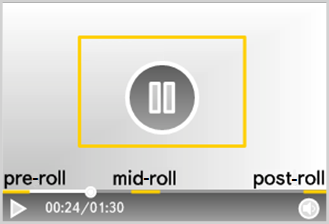
InStream: Advertising in linear video content embedded in a video player. Available for desktop and mobile site versions, as well as Smart TV apps.
The ad video can be played in the following scenarios:
- Pre-roll: Before the main content (maximum one unit).
- Post-roll: After the main content (maximum one unit).
- Mid-roll: At a specific time during the main content (maximum seven units).
- Pause-roll: When the Pause button is pressed (maximum one unit).
- Post-Pause-roll: After the video is unpaused (if the pause duration was 60 seconds or more).
- In-roll: When a certain point in the video is reached (only supported by the Yandex video player).
Note
To start showing InStream video ads, integrate Yandex Video Ads SDK into the partner's video player. To learn more, see Video advertising integration models.
Contact support
Write to WhatsApp

|
Scan the QR code. WhatsApp is a third-party channel for communication with Yandex. We do not control and are not liable for how WhatsApp stores your data and chat history. Please keep this in mind when choosing WhatsApp to contact support. |
WhatsApp is a third-party channel for communication with Yandex. We do not control and are not liable for how WhatsApp stores your data and chat history. Please keep this in mind when choosing WhatsApp to contact support.
Go to WhatsAppWrite to Telegram

|
Scan the QR code. Telegram is a third-party channel for communication with Yandex. We do not control and are not liable for how Telegram stores your data and chat history. Please keep this in mind when choosing Telegram to contact support. |
Telegram is a third-party channel for communication with Yandex. We do not control and are not liable for how Telegram stores your data and chat history. Please keep this in mind when choosing Telegram to contact support.
Go to TelegramYou can also go to
