Multi-goal
With a multi-goal, you can combine several different types of conditions into a single goal, including both online and offline events. This helps you collect unified statistics on events that address the same business objective but have different technical parameters.
A goal is considered completed if at least one of the conditions specified in the multi-goal settings is met. If multiple events matching the multi-goal conditions occur within a single session, each event is counted as a conversion.
How to create a multi-goal
-
In Yandex Metrica, go to the Goals page in the left menu.
-
Click Add goal.
-
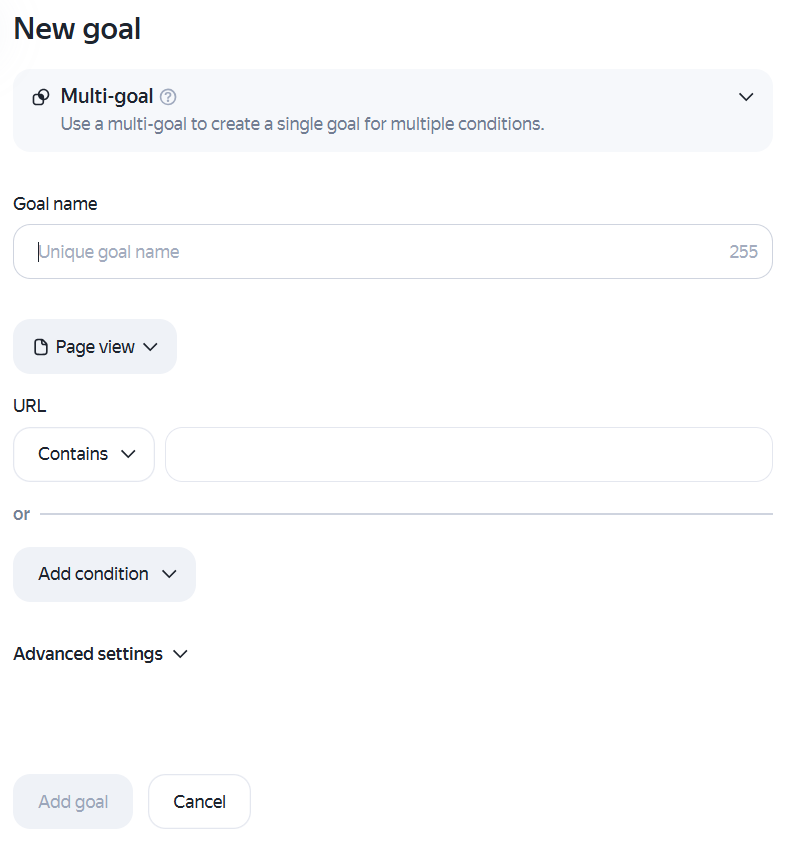
Select the Multi-goal goal type.
-
In the Name field, enter a name for the goal to create.
-
Add the conditions you need. You can use the available goal types as conditions:
- Conversion
- Pageviews
- Site search
- Form submission
- Button click
- Click on phone number
- Click on email
- Calls
- Chats
- Open messenger
- Clicks to social networks
- Return from payment system
- File download
- Parameters
You can select no more than 10 conditions.
-
Click Add goal. The created goal will appear in the list of goals. Yandex Metrica will start collecting statistics on it within a few minutes.
Revenue transfer
For a multi-goal, revenue can be reported in two ways:
- By sending revenue data directly through a condition. To learn more, see Revenue by goal.
- As static revenue specified in the goal's additional settings.
Requirements and restrictions
-
The conditions described in these steps are combined using the logical
ORoperator. A goal is considered completed if at least one of its conditions is met. -
A maximum of 200 goals can be set for each tag.
-
The service registers a user reaching the same goal on the same counter no more than once per second.
-
During a single user session, the service can register up to 1000 offline conversions and 400 online conversions created for the tag.
-
If you edit the tag or a goal, all the previously collected information does not change.
-
If you delete a goal, information collected for it is no longer available in reports.
|
Useful links |
Online training |