Yandex ID (Key) access
Device requirements
To generate one-time passwords in the Yandex ID (Key) app, your device must be secured with a PIN, biometrics (face or fingerprint recognition), or a pattern lock. Before using the app, enable a screen lock in your phone or tablet settings.
Choose a security method
To generate one-time codes, you need to set up a security method in Yandex ID (Key) — either biometrics or a master password.
Note
You can use a master password in Yandex ID (Key) version 3.4.0 and later on iOS, and version 3.4.2 and later on Android.
Before showing a one-time code for an account that uses two-factor authentication, Yandex ID (Key) will ask for your biometrics or master password.
To set up a security method:
- Allow Yandex ID (Key) to access biometrics in your device settings.
- Open the Yandex ID (Key) app and tap .
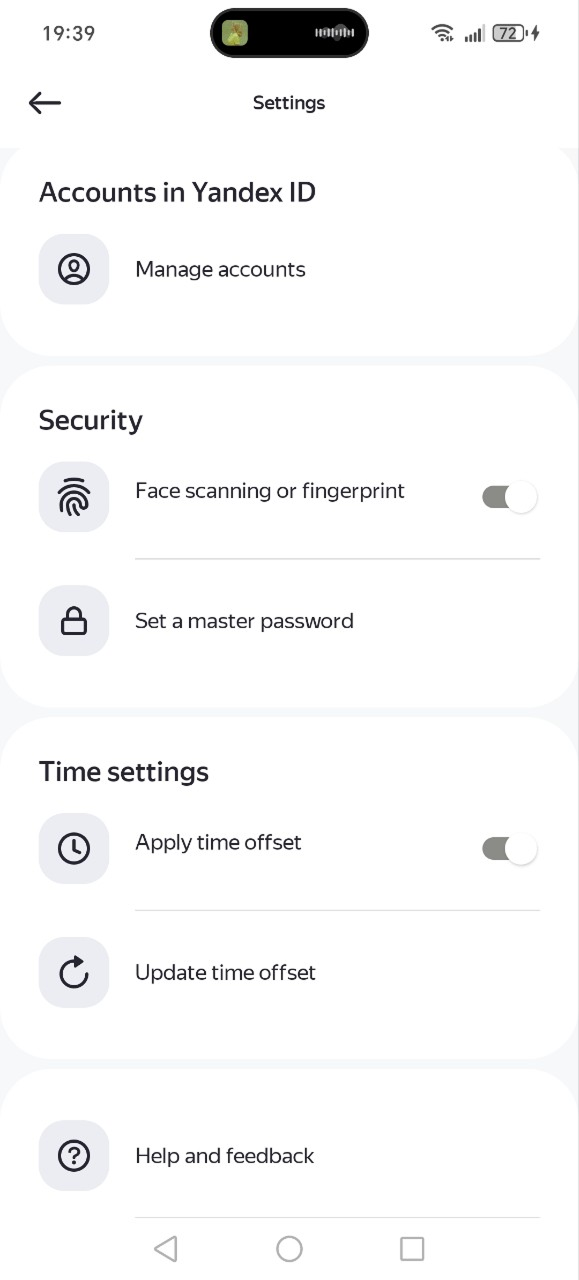
- Under Security, enable Face scanning or fingerprint.
- Confirm your identity using biometrics.
- Open the Yandex ID (Key) app and tap .
- Under Security, tap Set a master password.
- Come up with a master password that is 4 to 16 digits long.
- Confirm it.
What it looks like in Yandex ID (Key)
Change the security method
You can change your security method at any time in the Yandex ID (Key) settings under Security.
If you don't want to authenticate using biometrics, set a master password so you can disable Face scanning or fingerprint.
To change your master password, you'll need to enter your current one. If you forget it, you won't be able to change your master password.
I forgot my master password
Only you know this password. Yandex can't tell you what it is. To set up a new security method, you'll need to reinstall the Yandex ID (Key) app and restore your accounts from a backup.
Warning
If you don't have a backup, all accounts will be removed from the app. You will then have to contact each service's support to restore access.
To restore access to your account manually (without a backup):
- For Yandex ID, follow the instructions.
- For a third-party service account, contact the service's support and follow their instructions.
Migrate from Yandex ID (Key) versions older than 3.0
When updating the app to a version later than 3.0, update the previously added accounts or ignore the update if you don't need your old accounts.
If you've added accounts to an older version of Yandex ID (Key) (prior to 3.0), they will update automatically the next time you log in. The process depends on the security method selected in the app.
Once you authenticate using biometrics, your accounts will update and transfer to the new Yandex ID (Key).
You'll need to enter your master password. If you don't remember it, you won't be able to transfer accounts.
If you have the latest backup of your accounts, you can skip the update — all accounts will be removed from the app, but you'll be able to restore them from a backup.