Placement methods
After signing the agreement, you are assigned a CLID and a partner link. These are found in your Yandex Distribution account (Products → Builds). You can use your CLID and partner link to embed a selection of games on your website. For example, you can choose only sports games, financial games, or puzzles.
-
Select the games you want to place on your site.
-
Contact support. In the email, specify links to the games you chose. We'll send you a JSON file with a high-quality thumbnail, link, and brief description for each game.
-
You may change the link for each game or create one yourself. We recommend that you use the link from your personal account: this way, we're sure it contains no errors.
How to create a link
The link must include 4 parts:
-
Content on Yandex Game Services, for example:
https://yandex.com/games -
The UTM tag for collecting statistics, for example:
?utm_source=distrib&utm_mediumNote
The utm_source=distrib tag is important for collecting statistics, so we ask you not to forget about it.
-
Your website name or username on Yandex, for example:
=partner_name -
The CLID of the website where the link will be placed, for example:
&clid=XXXXXXXAs a result, we get the following link:
https://yandex.ru/games?utm_source=distrib&utm_medium=partner_name&clid=XXXXXXX
-
-
Add the game links to your website via iframe, for example:
<iframe> src="https://yandex.ru/games/app/171283?utm_source=distrib&utm_medium=partner_name&clid=XXXXXXX" width="100%" height="100%" scrolling="none" frameborder="0" webkitallowfullscreen="webkitallowfullscreen" mozallowfullscreen="mozallowfullscreen" allowfullscreen="allowfullscreen" </iframe> -
In case of selected games placement, please request API key from games-partners@yango.com. This will allow you to get JSON file with all updated information about each game via API. We recommend to get updated files once a week.
You can embed the entire Yandex Game Services catalog as a separate page on your website. Your site visitors will have access to over 21,000 games, so everyone will find a game they like.
How it works
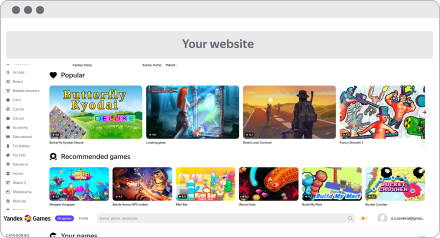
-
After signing the agreement, you are assigned a CLID and a partner link. Get it in your Yandex Distribution account (Products → Builds) or create one yourself. We recommend that you use the link from your personal account: this way, we're sure it contains no errors.
How to create a link
The link must include 4 parts:
-
Content on Yandex Game Services, for example:
https://yandex.com/games -
The UTM tag for collecting statistics, for example:
?utm_source=distrib&utm_mediumNote
The utm_source=distrib tag is important for collecting statistics, so we ask you not to forget about it.
-
Your website name or username on Yandex, for example:
=partner_name -
The CLID of the website where the link will be placed, for example:
&clid=XXXXXXX
As a result, we get the following link:
https://yandex.ru/games?utm_source=distrib&utm_medium=partner_name&clid=XXXXXXX -
-
Create a separate page for the game catalog on your platform.
-
Embed the resulting link in your site's page code in an
<iframe>, for example:<iframe> src="https://yandex.ru/games?utm_source=distrib&utm_medium=partner_name&clid=XXXXXXX" width="100%" height="100%" scrolling="none" frameborder="0" webkitallowfullscreen="webkitallowfullscreen" mozallowfullscreen="mozallowfullscreen" allowfullscreen="allowfullscreen"> </iframe>
After signing the agreement, you are assigned a CLID and a partner link. Get it in your Yandex Distribution account (Products → Builds). Use the link you received or created in an article, button, or banner. We recommend that you use the link from your personal account: this way, we're sure it contains no errors. You can use our banner templates.
How it works
How to create a link
The link must include 4 parts:
-
Content on Yandex Game Services, for example:
https://yandex.com/games -
The UTM tag for collecting statistics, for example:
?utm_source=distrib&utm_mediumNote
The utm_source=distrib tag is important for collecting statistics, so we ask you not to forget about it.
-
Your website name or username on Yandex, for example:
=partner_name -
The CLID of the website where the link will be placed, for example:
&clid=XXXXXXX
As a result, we get the following link:
https://yandex.ru/games?utm_source=distrib&utm_medium=partner_name&clid=XXXXXXX
Using the VID identifier
Learn more in the VID Identifier section.
Helps to establish the page from which the user was redirected.
Your unique Yandex Game Services partner ID that you can found in the Products section.