How to become a partner
Note
Persons not registered as sole proprietors or self-employed individuals can't become our partners. We don't accept requests from offshore zones either.
Step 1. Register
-
Read our requirements for traffic sources (platforms and placement methods).
-
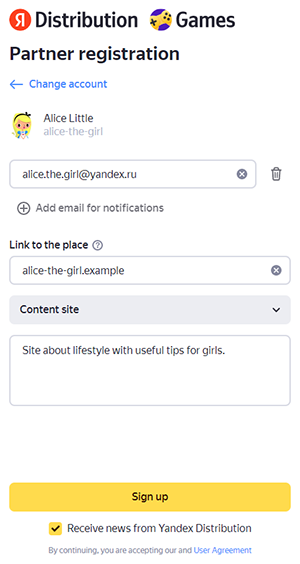
Register in Yandex Distribution:
-
Enter your email address.
-
Enter your platform's URL where you plan to integrate Yandex Game Services.
-
Enter the platform name (for example, "All things games").
-
Platform type.
-
Comment about the platform's special features.
Screenshot — Registration
-
-
If you own another platform, click Add another platform and repeat step 3.
-
Click Done.
-
Go to Yandex services.
-
Choose Yandex Game Services.
Step 2. Pass moderation
Moderation takes from 2 to 14 workdays.
Check the Dashboard page in Yandex Distribution regularly: the form for concluding an agreement will appear there after your platform is approved by moderators.
Step 3. Submit your application for an agreement
-
Open the Yandex Distribution interface.
-
Go to Dashboard and click Complete form.
-
Specify how you are going to cooperate with the partner network: as a company or sole proprietor.
-
Choose the country of registration.
-
Enter your details.
-
Specify your personal details if you are entering into the agreement as a sole proprietor, or your signer details if you are entering into the agreement as a company. Enter the payment information (the bank's BIC and the account number for receiving payment). If you are a sole proprietor and know only your bank card number, go to your account on your bank's website or visit the bank's office to find out what account the card is linked to. Remuneration can only be paid to a USD or EUR bank account opened in the name of the Contractor in accordance with the Agreement in a foreign bank (registered outside of the Russian Federation) that accepts SWIFT transfers.
-
The offer is generated automatically. Download and read it.
-
Click Send request. By doing this, you agree to all the terms and conditions of the agreement. You don't need to sign anything by hand.
It usually takes from 2 to 14 workdays to process the application. After signing the contract, you'll receive your partner link in your Yandex Distribution account.
Step 4. Get your partner link
After you sign the agreement with Yandex Game Services, your partner link will appear under Products → Builds. When it's ready, you'll receive a notification by email.
Note
You can also create a partner link yourself. But we recommend using the link from your personal account: this way, we can be sure it contains no errors.
To get a partner link:
-
Click the link in the notification. You'll go to your personal account and see the Copying distribution packages banner.
-
On the banner, click Get build.
-
Copy the partner link.
-
Integrate the link on your site in a way that's convenient for you.