Pixel-based segment
You can create a segment based on a pixel. In the Segments tab, click Create segment and choose Based on Yandex data → Yandex Audience Pixel. Enter the name of the segment and choose the pixel.
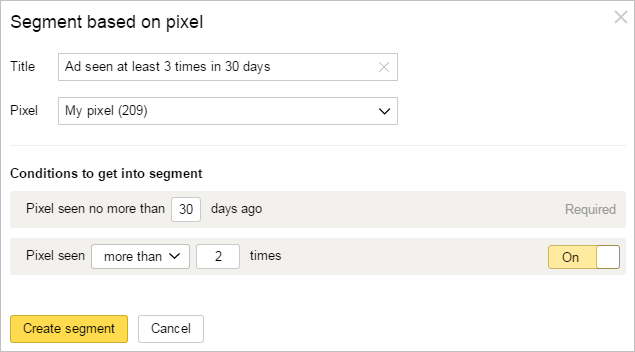
Specify the period from 1 to 90 days. The segment will include anonymous IDs of the users who viewed promotion materials containing the pixel during the specified time. Additionally, you can specify how many times the user has to view promotion materials during the specified period.
For example, to select the users who viewed your media banner at least 3 times over the last 30 days, create the following segment:
The segment you create will be assigned the "Processing" status. Processing can take up to 2 hours. If the audience reach is at least 100 anonymous IDs, the segment's status changes to "Finished". Then you can use this segment to set up your ads.
Learn more
Still have questions?
Alert
Customer support agents can only assist you with campaigns associated with your username. You can see your current username it in the upper-right corner of the screen. The agent will get access to your data only when processing your request.
Message in WhatsApp