Similar users segment
To create a similar users segment, you can only use one of your own segments in the “Finished” status. You can't create similar users segments based on segments which you have been given access to by other Yandex Audience users.
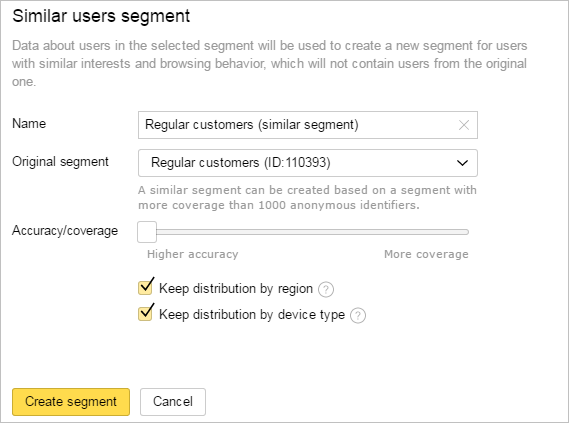
In the Segments tab, click Create segment and choose Derivative segment → Similar segment. Alternatively, click  in the row for the source segment and choose Similar users segment. Enter the name for your new segment and choose the original segment you want to use.
Yandex Audience selects users with similar interests and internet behavior based on the data from your original segment. Users from your original segment will not end up in the new segment.
Decide how similar the users in the new segment must be to the users in the original segment. Remember: the better the users in the segment you create match the users in the original segment, the fewer cookies will be added to the created segment.
By default, the distribution of users by city and device type in the new segment will be close to the original segment. For example, if in the original segment half of the users were from Moscow, and the other half from Saint Petersburg, then in the new segment there will be same distribution of users by city. If you can't find users while maintaining the original distribution, Yandex Audience will select the most similar users regardless of the city or device type. To find users in any city or with any device, turn off the relevant options.
The segment you create will be assigned the "Processing" status. Processing time depends on the settings you selected and will take at least two hours.
If the audience reach is at least 100 anonymous IDs, the segment's status changes to "Finished". Then you can use this segment to set up your ads.
Learn more
Still have questions?
Alert
Customer support agents can only assist you with campaigns associated with your username. You can see your current username it in the upper-right corner of the screen. The agent will get access to your data only when processing your request.
Message in WhatsApp