Segment based on the AppMetrica data
AppMetrica is a service for mobile app tracking and analytics. AppMetrica collects and handles information about the application and its users. Add the application in AppMetrica and integrate AppMetrica SDK in your application. Learn more in AppMetrica Help.
Use this service to identify user segments that have certain characteristics or those users who completed certain actions in the app (for example, completed an in-game level or placed an order).
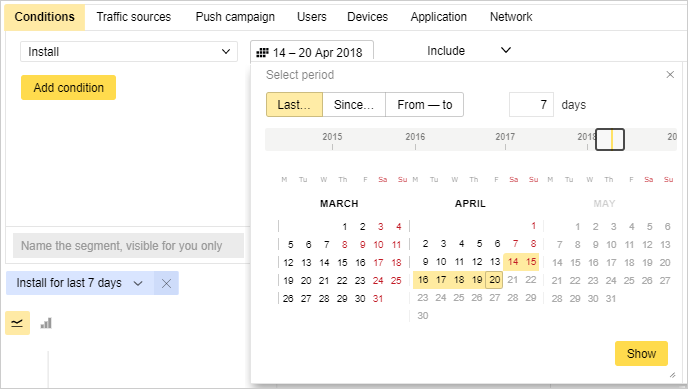
For example, you need to create a segment of users who installed the game during the recent week. In AppMetrica, go to any report and choose the Conditions category. From the drop-down list, choose the event and specify the period in which it has to happen. Set the name of the segment.
You can create a segment in Yandex Audience based on the data from your app or from an app you have access to.
In the Segments tab, click Create segment and choose Based on Yandex data → AppMetrica. Specify the name, the application and specify the data for choosing the users. Note that the segment is based on the data for the past 90 days.
You can select the following attribution modes for segments based on AppMetrica data:
- Cross-Device: The segment includes other devices associated with the uploaded ID and belonging to the same user.
- In‑Device: The segment includes only the uploaded devices, without expanding to other devices.
If you're applying the segment in a retargeting campaign, we recommend using In-Device mode.
The segment you create will be assigned the "Processing" status. Processing can take up to two hours. If the audience reach is at least 100 anonymous IDs, the segment's status changes to "Finished". Then you can use this segment to set up your ads.
If access to the app is revoked, the segment's status changes to "Inactive" and ad impressions stop.
Learn more
Still have questions?
Alert
Customer support agents can only assist you with campaigns associated with your username. You can see your current username it in the upper-right corner of the screen. The agent will get access to your data only when processing your request.
Message in WhatsApp