使用示例
使用扩展配置进行库初始化
要用扩展的启动配置初始化库,请创建 AppMetricaConfig 类的实例,设置相应的参数,然后使用 AppMetrica.Activate([NotNull] AppMetricaConfig config) 方法激活库。 使用扩展配置,您可以启用或禁用日志记录、设置会话超时、传递用于跟踪预安装应用的参数等。
扩展配置设置在库初始化时立即生效。
AppMetrica.Activate(new AppMetricaConfig(API_KEY) {
    Logs = true,
});
在应用程序运行时配置库,请使用AppMetrica类的方法。
向额外的 API 密钥发送统计数据
将数据发送到额外的 API 密钥可以让您为这些 API 密钥收集自己的统计数据。 你可以用这来控制其他用户对信息的访问权限。 例如,为了给分析师提供统计数据的访问权限,可以为额外的 API 密钥复制发送营销数据。 这样他们只会有对需要的信息的访问权限。
要将数据发送到额外的 API 密钥,必须使用报告器。 就像主 API 密钥一样,你可以为报告员设置扩展的启动配置,发送事件、配置文件信息和应用内购买的数据。 报告器可以在不初始化AppMetrica SDK的情况下工作。
步骤 1. (可选) 使用扩展配置初始化报告器
要用扩展配置初始化报告器,请创建 ReporterConfig 类的实例,设置相应参数,然后使用 AppMetrica.ActivateReporter([NotNull] ReporterConfig config) 方法激活报告器。 此配置用于具有指定 API 密钥的报告员。 您可以为每个附加的 API 密钥设置自己的配置。
注意
在第一次调用报告器之前,应初始化具有扩展配置的报告器。 否则,报告器将在没有配置的情况下初始化。
AppMetrica.ActivateReporter(new ReporterConfig(ANOTHER_API_KEY) {
    Logs = true,
});
步骤 2. 配置使用报告器发送数据
要使用报告器发送数据,请通过 AppMetrica.GetReporter([NotNull] string apiKey) 方法获取实现 IReporter 接口的对象,然后使用接口方法发送报告。 如果报告器没有用扩展配置进行初始化,调用此方法将会为指定的API密钥初始化报告器。
事件发送示例:
AppMetrica.GetReporter(ANOTHER_API_KEY).ReportEvent("Updates installed");
为了正确追踪,请手动配置报告器,以便每个报告器发送关于会话开始和暂停的事件。 要完成这一操作,请使用 ResumeSession() 和 PauseSession() 方法,它们属于 IReporter 接口:
AppMetrica.GetReporter(ANOTHER_API_KEY).ResumeSession();

AppMetrica.GetReporter(ANOTHER_API_KEY).PauseSession();
追踪应用崩溃
应用程序崩溃的报告默认会被发送。
要禁用自动监控,请用禁止发送崩溃报告的配置初始化库。 要做到这一点,在创建扩展库配置时,将 false 传递给 CrashReporting 属性。
AppMetrica.Activate(new AppMetricaConfig(API_KEY) {
    CrashReporting = false,
});
如果自动监控被禁用,您可以手动提交崩溃信息。
手动监控应用崩溃
应用程序崩溃的报告默认会被发送。 为了防止手动发送崩溃时事件重复,请禁用应用崩溃的自动监控。
要手动发送崩溃数据,请使用 AppMetrica.ReportUnhandledException([NotNull] Exception exception) 方法:
try
{
    ...
}
catch (Exception ex)
{
    AppMetrica.ReportUnhandledException(ex);
}
使用库发送设备位置
备注
默认情况下,发送设备位置已禁用。
要启用发送功能,请用配置初始化库,其中已启用发送设备位置数据。 要做到这一点,在创建扩展库配置时,将 true 传递给 LocationTracking 属性。
AppMetrica.Activate(new AppMetricaConfig(API_KEY) {
    LocationTracking = true,
});
要在应用运行时启用发送,请使用 AppMetrica.SetLocationTracking(bool enabled) 方法:
AppMetrica.SetLocationTracking(true);
为了获得更精确的位置信息,请在 AndroidManifest.xml 文件中添加以下权限之一:
- android.permission.ACCESS_COARSE_LOCATION — 用于粗略定位。
- android.permission.ACCESS_FINE_LOCATION — 用于精确定位。
手动设置位置
在发送自身设备位置数据之前,请确保已启用报告发送。
库会自行确定设备位置。 要发送自定义的设备位置数据,请将 Location 类的实例传递给 AppMetrica.SetLocation([CanBeNull] Location? location) 方法:
AppMetrica.SetLocation(new Location {
    Latitude = ... ,
    Longitude = ... ,
});
要通过启动配置发送自身的设备位置数据,在创建扩展库配置时,将 Location 类的实例传递给 Location 属性。
AppMetrica.Activate(new AppMetricaConfig(API_KEY) {
    Location = new Location {
        Latitude = ... ,
        Longitude = ... ,
    },
});
要恢复库的位置检测,请调用 AppMetrica.SetLocation([CanBeNull] Location? location) 方法,传入 null,并配置 发送设备位置数据。
AppMetrica.SetLocation(null);
发送自定义事件
要发送自定义事件(不包含嵌套参数),请将事件的短名称或描述传递给 AppMetrica.ReportEvent([NotNull] string eventName) 方法:
AppMetrica.ReportEvent("Updates installed");
发送自定义事件(包含嵌套参数)
使用 AppMetrica SDK,您可以发送自定义事件,事件包含嵌套参数,参数以 JSON 字符串格式传递。
要传递嵌套的事件参数(JSON 格式),请使用 AppMetrica.ReportEvent([NotNull] string eventName, [CanBeNull] string jsonValue) 方法:
string eventParameters = "{\"name\":\"Alice\", \"age\":\"18\"}";
AppMetrica.ReportEvent("New person", eventParameters);
网页界面AppMetrica显示事件最多五级嵌套。 如果事件有六级或更多级别,报告中只显示前五级。 您可以使用报告 API导出最多十个级别。
要了解有关事件的更多信息,请查看事件。
发送自定义错误消息
要发送自定义的错误消息,请使用以下方法:
AppMetrica.ReportError([NotNull] string message, [NotNull] Exception error);
AppMetrica.ReportError([NotNull] string identifier, [CanBeNull] string message = null, [CanBeNull] Exception error = null);
带有 groupIdentifier 的示例
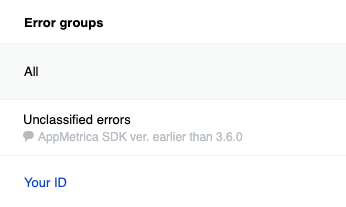
如果你使用带有 groupIdentifier 的方法发送错误,它们会按 ID 分组。
try
{
    ...
}
catch (Exception ex)
{
    AppMetrica.ReportError("Your ID", "Error while parsing some integer number", ex);
}
不要使用变量值作为分组 ID。 否则,组的数量会增加,分析起来就会变得困难。
带有消息的示例
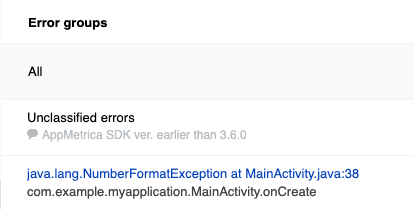
如果使用 AppMetrica.ReportError([NotNull] string message, [NotNull] Exception error) 方法发送错误,它们会按照 堆栈跟踪 分组。
try
{
    ...
}
catch (Exception ex)
{
    AppMetrica.ReportError("Error while parsing some integer number", ex);
}
从缓冲区发送事件
AppMetrica SDK 不会在事件发生后立即发送事件。 库存放事件数据在缓冲区中。 The SendEventsBuffer 方法会启动从缓冲区发送数据并清空缓冲区。 使用该方法在用户场景的重要检查点之后强制发送已存储的事件。
AppMetrica.SendEventsBuffer();
如果您经常使用此方法,可能会导致互联网流量和电力消耗增加。
手动监控应用生命周期
AppMetrica 会自动跟踪会话边界。 如果需要,您可以通过在扩展库配置中将 false 传递给 SessionsAutoTrackingEnabled 属性来禁用自动会话跟踪。
AppMetrica.Activate(new AppMetricaConfig(API_KEY) {
    SessionsAutoTrackingEnabled = false,
});
要手动监控应用生命周期,请使用以下方法:
-
暂停会话:
AppMetrica.PauseSession(); -
恢复会话或开始新会话:
AppMetrica.ResumeSession();
Sending ProfileId
如果您在初始化 AppMetrica SDK 之前知道用户资料 ID,请在初始化前传递它 (SetUserProfileID) 或在使用扩展配置进行初始化时传递 (UserProfileID)。
否则,使用 ID appmetrica_device_id 创建用户配置文件.
AppMetrica 在网页界面中不会显示 预定义属性,如果未配置 ProfieId 的发送。
您可以在任何时候通过调用 ProfileId 来更新 setUserProfileID:
AppMetrica.SetUserProfileID("id");
发送个人属性
要发送用户属性,请将必要的属性传递给 UserProfile 类的实例,然后使用 AppMetrica.ReportUserProfile([NotNull] UserProfile profile) 方法发送该实例。 要创建个人属性,请使用Attribute类的方法。
using Io.AppMetrica;
using Io.AppMetrica.Profile;

...

// Creating the UserProfile instance.
UserProfile userProfile = new UserProfile()

    // Updating predefined attributes.
    .Apply(Attribute.Name().WithValue("John"))
    .Apply(Attribute.Gender().WithValue(GenderAttribute.Gender.Male))
    .Apply(Attribute.BirthDate().WithAge(24))
    .Apply(Attribute.NotificationsEnabled().WithValue(false))

    // Updating custom attributes.
    .Apply(Attribute.CustomString("string_attribute").WithValue("string"))
    .Apply(Attribute.CustomBoolean("boolean_attribute").WithValue(true))
    .Apply(Attribute.CustomNumber("number_attribute").WithValue(55))
    .Apply(Attribute.CustomCounter("counter_attribute").WithDelta(1));

// Setting the ProfileID using the method of the AppMetrica class.
AppMetrica.SetUserProfileID("id");

// Sending the UserProfile instance.
AppMetrica.ReportUserProfile(userProfile);
发送电子商务事件
AppMetrica 不允许将电商事件分为测试事件和非测试事件。 如果你使用主 API 密钥调试购买,测试事件会被包含在总体统计中。 因此,要调试电商事件发送,请使用报告器将统计数据发送到额外的API密钥。
步骤 1. 配置将电子商务事件发送到测试 API 密钥
对于不同的用户操作,存在相应的电商事件类型。 要创建特定事件类型,请使用适当的 ECommerceEvent 类方法。
下面的示例展示了如何发送特定类型的事件:
打开页面
using Io.AppMetrica;
using Io.AppMetrica.Ecommerce;

...

IDictionary<string, string> payload = new Dictionary<string, string>();
payload.Add("configuration", "landscape");
payload.Add("full_screen", "true");
// Creating a screen object.
ECommerceScreen screen = new ECommerceScreen();
screen.Name = "ProductCardActivity";
screen.CategoriesPath = new string[] { "Promos", "Hot Deal" };
screen.SearchQuery = "danissimo maple syrup";
screen.Payload = payload;

ECommerceEvent showScreenEvent = ECommerceEvent.ShowScreenEvent(screen);
// Sending an E-commerce event.
AppMetrica.GetReporter("Testing API key").ReportECommerce(showScreenEvent);
查看产品卡片
using Io.AppMetrica;
using Io.AppMetrica.Ecommerce;

...

IDictionary<string, string> payload = new Dictionary<string, string>();
payload.Add("configuration", "landscape");
payload.Add("full_screen", "true");
// Creating a screen object.
ECommerceScreen screen = new ECommerceScreen();
screen.Name = "ProductCardActivity";
screen.CategoriesPath = new string[] { "Promos", "Hot Deal" };
screen.SearchQuery = "danissimo maple syrup";
screen.Payload = payload;
// Creating an actualPrice object.
ECommercePrice actualPrice = new ECommercePrice(new ECommerceAmount(4.53, "USD"));
actualPrice.InternalComponents = new ECommerceAmount[] { // Optional.
    new ECommerceAmount(30_570_000, "wood"),
    new ECommerceAmount(26.89, "iron"),
    new ECommerceAmount(new decimal(5.1), "gold")
};
// Creating an originalPrice object.
ECommercePrice originalPrice = new ECommercePrice(new ECommerceAmount(5.78, "USD"));
originalPrice.InternalComponents = new ECommerceAmount[] { // Optional.
    new ECommerceAmount(30_590_000, "wood"),
    new ECommerceAmount(26.92, "iron"),
    new ECommerceAmount(new decimal(5.5), "gold")
};
// Creating a product object.
ECommerceProduct product = new ECommerceProduct("779213");
product.ActualPrice = actualPrice; // Optional.
product.Promocodes = new string[] { "BT79IYX", "UT5412EP" }; // Optional.
product.Payload = payload; // Optional.
product.OriginalPrice = originalPrice; // Optional.
product.Name = "Danissimo curd product 5.9%, 130 g"; // Optional.
product.CategoriesPath = new string[] { "Groceries", "Dairy", "Yogurts" }; // Optional.
ECommerceEvent showProductCardEvent = ECommerceEvent.ShowProductCardEvent(product, screen);
// Sending an E-commerce event.
AppMetrica.GetReporter("Testing API key").ReportECommerce(showProductCardEvent);
查看产品页面
using Io.AppMetrica;
using Io.AppMetrica.Ecommerce;

...

IDictionary<string, string> payload = new Dictionary<string, string>();
payload.Add("configuration", "landscape");
payload.Add("full_screen", "true");
// Creating a screen object.
ECommerceScreen screen = new ECommerceScreen();
screen.Name = "ProductCardActivity";
screen.CategoriesPath = new string[] { "Promos", "Hot Deal" };
screen.SearchQuery = "danissimo maple syrup";
screen.Payload = payload;
// Creating an actualPrice object.
ECommercePrice actualPrice = new ECommercePrice(new ECommerceAmount(4.53, "USD"));
actualPrice.InternalComponents = new ECommerceAmount[] { // Optional.
    new ECommerceAmount(30_570_000, "wood"),
    new ECommerceAmount(26.89, "iron"),
    new ECommerceAmount(new decimal(5.1), "gold")
};
// Creating an originalPrice object.
ECommercePrice originalPrice = new ECommercePrice(new ECommerceAmount(5.78, "USD"));
originalPrice.InternalComponents = new ECommerceAmount[] { // Optional.
    new ECommerceAmount(30_590_000, "wood"),
    new ECommerceAmount(26.92, "iron"),
    new ECommerceAmount(new decimal(5.5), "gold")
};
// Creating a product object.
ECommerceProduct product = new ECommerceProduct("779213");
product.ActualPrice = actualPrice; // Optional.
product.Promocodes = new string[] { "BT79IYX", "UT5412EP" }; // Optional.
product.Payload = payload; // Optional.
product.OriginalPrice = originalPrice; // Optional.
product.Name = "Danissimo curd product 5.9%, 130 g"; // Optional.
product.CategoriesPath = new string[] { "Groceries", "Dairy", "Yogurts" }; // Optional.
ECommerceEvent showProductCardEvent = ECommerceEvent.ShowProductCardEvent(product, screen);
// Sending an E-commerce event.
AppMetrica.GetReporter("Testing API key").ReportECommerce(showProductCardEvent);
将物品添加到购物车/从购物车中移除
using Io.AppMetrica;
using Io.AppMetrica.Ecommerce;

...

IDictionary<string, string> payload = new Dictionary<string, string>();
payload.Add("configuration", "landscape");
payload.Add("full_screen", "true");
// Creating a screen object.
ECommerceScreen screen = new ECommerceScreen();
screen.Name = "ProductCardActivity";
screen.CategoriesPath = new string[] { "Promos", "Hot Deal" };
screen.SearchQuery = "danissimo maple syrup";
screen.Payload = payload;
// Creating an actualPrice object.
ECommercePrice actualPrice = new ECommercePrice(new ECommerceAmount(4.53, "USD"));
actualPrice.InternalComponents = new ECommerceAmount[] { // Optional.
    new ECommerceAmount(30_570_000, "wood"),
    new ECommerceAmount(26.89, "iron"),
    new ECommerceAmount(new decimal(5.1), "gold")
};
// Creating an originalPrice object.
ECommercePrice originalPrice = new ECommercePrice(new ECommerceAmount(5.78, "USD"));
originalPrice.InternalComponents = new ECommerceAmount[] { // Optional.
    new ECommerceAmount(30_590_000, "wood"),
    new ECommerceAmount(26.92, "iron"),
    new ECommerceAmount(new decimal(5.5), "gold")
};
// Creating a product object.
ECommerceProduct product = new ECommerceProduct("779213");
product.ActualPrice = actualPrice; // Optional.
product.Promocodes = new string[] { "BT79IYX", "UT5412EP" }; // Optional.
product.Payload = payload; // Optional.
product.OriginalPrice = originalPrice; // Optional.
product.Name = "Danissimo curd product 5.9%, 130 g"; // Optional.
product.CategoriesPath = new string[] { "Groceries", "Dairy", "Yogurts" }; // Optional.
// Creating a referrer object.
ECommerceReferrer referrer = new ECommerceReferrer();
referrer.Type = "button"; // Optional.
referrer.Identifier = "76890"; // Optional.
referrer.Screen = screen; // Optional.
// Creating a cartItem object.
ECommerceCartItem addedItems1 = new ECommerceCartItem(product, actualPrice, 1.0);
addedItems1.Referrer = referrer; // Optional.
ECommerceEvent addCartItemEvent = ECommerceEvent.AddCartItemEvent(addedItems1);
// Sending an E-commerce event.
AppMetrica.GetReporter("Testing API key").ReportECommerce(addCartItemEvent);
ECommerceEvent removeCartItemEvent = ECommerceEvent.RemoveCartItemEvent(addedItems1);
// Sending an E-commerce event.
AppMetrica.GetReporter("Testing API key").ReportECommerce(removeCartItemEvent);
开始并完成购买
using Io.AppMetrica;
using Io.AppMetrica.Ecommerce;

...

IDictionary<string, string> payload = new Dictionary<string, string>();
payload.Add("configuration", "landscape");
payload.Add("full_screen", "true");
// Creating a screen object.
ECommerceScreen screen = new ECommerceScreen();
screen.Name = "ProductCardActivity";
screen.CategoriesPath = new string[] { "Promos", "Hot Deal" };
screen.SearchQuery = "danissimo maple syrup";
screen.Payload = payload;
// Creating an actualPrice object.
ECommercePrice actualPrice = new ECommercePrice(new ECommerceAmount(4.53, "USD"));
actualPrice.InternalComponents = new ECommerceAmount[] { // Optional.
    new ECommerceAmount(30_570_000, "wood"),
    new ECommerceAmount(26.89, "iron"),
    new ECommerceAmount(new decimal(5.1), "gold")
};
// Creating an originalPrice object.
ECommercePrice originalPrice = new ECommercePrice(new ECommerceAmount(5.78, "USD"));
originalPrice.InternalComponents = new ECommerceAmount[] { // Optional.
    new ECommerceAmount(30_590_000, "wood"),
    new ECommerceAmount(26.92, "iron"),
    new ECommerceAmount(new decimal(5.5), "gold")
};
// Creating a product object.
ECommerceProduct product = new ECommerceProduct("779213");
product.ActualPrice = actualPrice; // Optional.
product.Promocodes = new string[] { "BT79IYX", "UT5412EP" }; // Optional.
product.Payload = payload; // Optional.
product.OriginalPrice = originalPrice; // Optional.
product.Name = "Danissimo curd product 5.9%, 130 g"; // Optional.
product.CategoriesPath = new string[] { "Groceries", "Dairy", "Yogurts" }; // Optional.
// Creating a referrer object.
ECommerceReferrer referrer = new ECommerceReferrer();
referrer.Type = "button"; // Optional.
referrer.Identifier = "76890"; // Optional.
referrer.Screen = screen; // Optional.
// Creating a cartItem object.
ECommerceCartItem addedItems1 = new ECommerceCartItem(product, actualPrice, 1.0);
addedItems1.Referrer = referrer; // Optional.
// Creating an order object.
ECommerceOrder order = new ECommerceOrder("88528768", new ECommerceCartItem[] { addedItems1 });
order.Payload = payload; // Optional.
ECommerceEvent beginCheckoutEvent = ECommerceEvent.BeginCheckoutEvent(order);
// Sending an E-commerce event.
AppMetrica.GetReporter("Testing API key").ReportECommerce(beginCheckoutEvent);
ECommerceEvent purchaseEvent = ECommerceEvent.PurchaseEvent(order);
// Sending an E-commerce event.
AppMetrica.GetReporter("Testing API key").ReportECommerce(purchaseEvent);
步骤 2. 查看测试应用的报告
在应用中进行测试购买。 过一会儿,在 AppMetrica 界面查看电商报告。 确保报告显示电子商务事件。
要了解更多关于报告的信息,请查看电子商务。
步骤 3. 配置将事件发送到主 API 密钥
测试成功后,配置将电子商务事件发送到主 API 密钥。
要将 ECommerceEvent 对象发送到主 API 密钥,请使用 AppMetrica.ReportECommerce([NotNull] ECommerceEvent ecommerce) 方法。
...
// Sending an E-commerce event.
AppMetrica.ReportECommerce(ecommerceEvent)
发送收入
备注
使用公钥进行本地验证,以验证 Android 上的购买操作。 要启用验证,请创建公钥并在设置中指定它。
步骤 1. 配置将收益发送到测试 API 密钥
AppMetrica 不允许你区分测试收入和非测试收入。 如果您使用主 API 密钥调试购买,测试购买会被包含在总体统计中。 因此,要调试收入发送,请使用报告器将统计数据发送到额外的 API 密钥。
此部分介绍将收入发送到额外 API 密钥的步骤:
带验证
为了验证购买,请配置发送 Revenue.Receipt 实例,同时配置 Revenue:
- 创建一个
Revenue.Receipt实例,包含购买信息和签名。 请在Revenue.Receipt属性中使用它,以在创建Revenue实例时. - 创建一个
收入实例。 - 将
Revenue实例发送到测试API密钥,使用IReporter。 要了解有关报告员的更多信息,请参见将统计数据发送到额外的 API 密钥。
下面的示例基于使用Unity IAP。
using Io.AppMetrica;

...

// Declaration of the Receipt structure for getting information about the IAP.
[System.Serializable]
public struct Receipt {
    public string Store;
    public string TransactionID;
    public string Payload;
}

// Additional information about the IAP for Android.
[System.Serializable]
public struct PayloadAndroid {
    public string Json;
    public string Signature;
}

public PurchaseProcessingResult ProcessPurchase(PurchaseEventArgs args) {
    var product = args.purchasedProduct;
    if (String.Equals(product.definition.id, kProductIDConsumable, StringComparison.Ordinal)) {
        string currency = product.metadata.isoCurrencyCode;
        decimal price = product.metadata.localizedPrice;

        // Creating an instance of the Revenue class.
        Revenue revenue = new Revenue(price, currency);
        if (product.receipt != null) {
            // Creating an instance of the Revenue.Receipt class.
            Revenue.Receipt yaReceipt = new Revenue.Receipt();
            Receipt receipt = JsonUtility.FromJson<Receipt>(product.receipt);
        #if UNITY_ANDROID
            PayloadAndroid payloadAndroid = JsonUtility.FromJson<PayloadAndroid>(receipt.Payload);
            yaReceipt.Signature = payloadAndroid.Signature;
            yaReceipt.Data = payloadAndroid.Json;
        #elif UNITY_IPHONE
            yaReceipt.TransactionID = receipt.TransactionID;
            yaReceipt.Data = receipt.Payload;
        #endif
            revenue.ReceiptValue = yaReceipt;
        }
        // Sending data to the AppMetrica server.
        AppMetrica.GetReporter("Testing API key").ReportRevenue(revenue);
    }
    return PurchaseProcessingResult.Complete;
}
不带验证
要在不进行验证的情况下发送购买信息:
-
创建一个
收入实例。 -
(可选) 要按
OrderID分组购买,请在Revenue.Payload属性中指定。备注
如果没有指定
OrderID,AppMetrica会自动生成ID。 -
将
Revenue实例发送到测试API密钥,使用IReporter。 要了解更多关于报告员的信息,请参见将统计数据发送到额外的API密钥。
using Io.AppMetrica;

...

public PurchaseProcessingResult ProcessPurchase(PurchaseEventArgs args) {
    var product = args.purchasedProduct;
    if (String.Equals(product.definition.id, kProductIDConsumable, StringComparison.Ordinal)) {
        string currency = product.metadata.isoCurrencyCode;
        decimal price = product.metadata.localizedPrice;

        // Creating an instance of the Revenue class.
        Revenue revenue = new Revenue(price, currency);
        revenue.Payload = "{\"OrderID\":\"Identifier\", \"source\":\"Google Play\"}";
        revenue.Quantity = 2;
        // Sending data to the AppMetrica server.
        AppMetrica.GetReporter("Testing API key").ReportRevenue(revenue);
    }
    return PurchaseProcessingResult.Complete;
}
步骤 2. 查看测试应用的报告
在AppMetrica报告中查看收入报告。 确保购买数量有所增加。
要了解更多关于报告的信息,请查看应用内收入和广告收入。
步骤 3. 配置将收入发送到主 API 密钥
测试成功后,将Revenue发送到主API密钥。
要将Revenue实例发送到主API密钥,请使用AppMetrica.ReportRevenue([NotNull] Revenue revenue)方法。
...
// Sending the Revenue instance.
AppMetrica.ReportRevenue(revenue);
Sending AdRevenue
使用此选项手动设置从广告盈利服务(提供展现级收入数据)传输数据。
创建一个 PluginErrorDetails 实例。
IDictionary<string, string> payload = new Dictionary<string, string>();
payload.Add("payload_key_1", "payload_value_1");
payload.Add("payload_key_2", "payload_value_2");
AdRevenue adRevenue = new AdRevenue(100.100, "USD");
adRevenue.AdNetwork = "ad_network";
adRevenue.AdPlacementId = "ad_placement_id";
adRevenue.AdPlacementName = "ad_placement_name";
adRevenue.AdType = AdType.Banner;
adRevenue.AdUnitId = "ad_unit_id";
adRevenue.AdUnitName = "ad_unit_name";
adRevenue.Precision = "some_precision";
adRevenue.Payload = payload;
发送 AdRevenue 实例,使用 AppMetrica.ReportAdRevenue([NotNull] AdRevenue adRevenue) 方法。
AppMetrica.ReportAdRevenue(adRevenue);
自动收集 AdRevenue 数据
AppMetrica 支持对某些广告服务的广告收益数据进行自动收集。
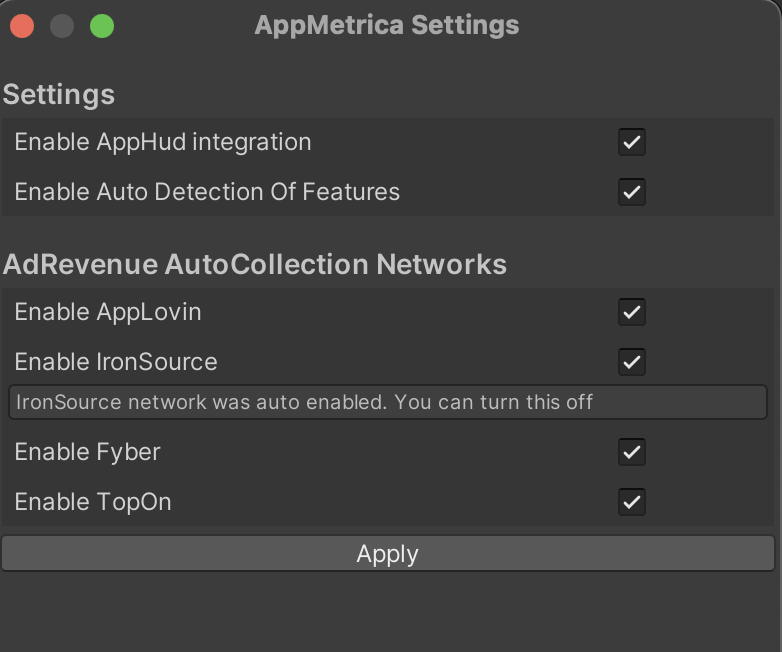
使用 Unity 库版本 6.5.0 或更高时,AppLovin、ironSource、TopOn 和 Yandex Mobile Ads 的自动数据收集默认已启用。 对于 Fyber(Digital Turbine),需要手动启用数据收集。
在为 Fyber(Digital Turbine)启用收集时,请确保不使用以下方法:
Banner.SetBannerListener();
Interstitial.SetInterstitialListener();
Rewarded.SetRewardedListener();
自动收集可能无法工作,如果您使用了上面列出的任何方法。
要禁用自动数据收集,请转到 资源 → AppMetrica → 设置,然后选择需要的广告服务。
要禁用自动检测已连接的广告服务,请关闭 启用功能自动检测 选项。
设置
设置会话超时时长
默认情况下,会话超时时间为10秒。 这是 SessionTimeout 参数的最低可接受值。
要更改超时时长,在创建扩展库配置时,将秒数传递给 SessionTimeout 属性。
AppMetrica.Activate(new AppMetricaConfig(API_KEY) {
    SessionTimeout = 15,
});
设置应用版本
默认情况下,应用版本在文件 build.gradle 中设置。
要程序化指定应用版本,在创建扩展库配置时,将应用版本传递给 AppVersion 属性。
AppMetrica.Activate(new AppMetricaConfig(API_KEY) {
    AppVersion = "1.13.2",
});
where 1.13.2 是应用版本。
确定库的版本
要从应用程序代码中确定库版本,请使用AppMetrica.GetLibraryVersion() 方法。
string libraryVersion = AppMetrica.GetLibraryVersion();
跟踪安装来源
在 AppMetrica SDK 中默认启用跟踪安装来源。
通过深链路跟踪应用打开
从 iOS/Android SDK 4.0 版本开始,当应用程序打开时,深链追踪会自动工作。 要了解更多信息,请查看深链追踪。
如果需要手动跟踪应用启动,请使用ReportAppOpen([NotNull] string deeplink) 方法:
AppMetrica.ReportAppOpen(deeplink);
备注
您可以通过 延迟深链 在 Android 上添加应用程序的打开功能。
要了解更多信息,请参见如何在 AppMetrica 中创建再营销活动?
请求延迟深链
要请求延迟深链,请将 DeferredDeeplink.DeeplinkDelegate 和 DeferredDeeplink.ErrorDelegate 代理传递给 AppMetrica.RequestDeferredDeeplink() 方法。 该方法仅在应用程序首次启动并获取 Google Play Install Referrer 后返回延迟深链。
void DeeplinkDelegate(string deeplink)
{
    Debug.Log("deeplink: " + deeplink);
}

void ErrorDelegate(DeferredDeeplink.Error? error, string referrer)
{
    Debug.Log("error: " + error + " referrer: " + referrer);
}

...

AppMetrica.RequestDeferredDeeplink(DeeplinkDelegate, ErrorDelegate);
关于延迟深链路的更多信息,请参见延迟深链路支持
请求延迟深度链接参数
要请求延迟深链的参数,请将实现 DeferredDeeplinkParameters.ParametersDelegate 和 DeferredDeeplinkParameters.ErrorDelegate 委托的方法传递给 AppMetrica.RequestDeferredDeeplinkParameters() 方法。 该方法仅在从 Google Play 获取安装来源(Install Referrer)后的第一次应用启动时返回延迟深链参数。
void DeeplinkParametersDelegate(IDictionary<string, string> parameters)
{
    foreach(KeyValuePair<string, string> pair in parameters)
    {
        Debug.Log("key: " + pair.Key + " Value: " + pair.Value);
    }
}

void ErrorParametersDelegate(DeferredDeeplinkParameters.Error? error, string referrer)
{
    Debug.Log("error: " + error + " referrer: " + referrer);
}

...

AppMetrica.RequestDeferredDeeplinkParameters(DeeplinkParametersDelegate, ErrorParametersDelegate);
关于延迟深链的更多信息,请参见延迟深链支持
跟踪新用户
默认情况下,当用户第一次打开应用时,会被视为新用户。 如果你将 AppMetrica SDK 连接到已有活跃用户的应用,可以设置跟踪新旧用户,以获取准确的统计数据。 通过初始化 AppMetrica SDK,使用扩展的 AppMetricaConfig 配置来进行设置:
using Io.AppMetrica;
using UnityEngine;

public static class AppMetricaActivator {
    [RuntimeInitializeOnLoadMethod(RuntimeInitializeLoadType.BeforeSceneLoad)]
    private static void Activate() {
        AppMetrica.Activate(new AppMetricaConfig("APIKey") {
            FirstActivationAsUpdate = !IsFirstLaunch(),
        });
    }

    private static bool IsFirstLaunch() {
        // Implement logic to detect whether the app is opening for the first time.
        // For example, you can check for files (settings, databases, and so on),
        // which the app creates on its first launch.
        return true;
    }
}
禁用和启用发送统计数据
如果需要在发送统计数据前获得用户确认,请将库初始化为禁用发送选项。 要做到这一点,在创建扩展库配置时,将 false 传递给 DataSendingEnabled 属性。
AppMetrica.Activate(new AppMetricaConfig(API_KEY) {
    DataSendingEnabled = false,
});
在用户授权发送统计数据后(例如在应用设置中或第一次启动应用时接受协议),使用 AppMetrica.SetDataSendingEnabled(bool enabled) 方法启用统计数据发送:
// Checking the status of the boolean variable. It shows the user confirmation.
if (flag) {
    // Enabling sending data.
    AppMetrica.SetDataSendingEnabled(true);
}
警告示例
您可以使用任何文本来告知用户统计数据的收集。 例如:
此应用使用由谷歌有限责任公司(莫斯科,俄罗斯,列夫·托尔斯泰街16号,邮编119021,以下称为“Yandex”)提供的AppMetrica分析服务,基于使用条款。
AppMetrica 分析应用使用数据,包括运行设备、安装来源,计算转化率,收集您的活动统计,用于产品分析、广告活动分析和优化,以及故障排查。 通过这种方式收集的信息无法识别您的身份。
AppMetrica 工具收集的关于您使用此应用的脱敏信息将会传输到 Yandex,并存储在位于欧盟和俄罗斯联邦的 Yandex 服务器上。 雅克沙将处理这些信息,以提供应用使用统计数据、生成应用性能报告并提供其他服务。
获取 SDK ID AppMetrica
要获取 AppMetrica SDK ID(DeviceId、DeviceIdHash、UUID),请使用 RequestStartupParams 方法。 要获取 appmetrica_device_id,请确保请求 DeviceIdHash.
void StartupParamsDelegateStartupParamsDelegate(StartupParamsResult result, StartupParamsErrorReason errorReason) {
    Debug.Log("Uuid: " + result.Uuid);
    Debug.Log("DeviceId: " + result.DeviceId);
    Debug.Log("DeviceIdHash: " + result.DeviceIdHash);
    Debug.Log("errorReason: " + errorReason);
}

...

IEnumerable<string> keys = new string[] { StartupParamsKey.AppMetricaUuid, StartupParamsKey.AppMetricaDeviceID, StartupParamsKey.AppMetricaDeviceIDHash };
AppMetrica.RequestStartupParams(StartupParamsDelegateStartupParamsDelegate, keys);
传递设备类型
如果您想设置设备类型,请在创建配置时指定它:
AppMetrica.Activate(new AppMetricaConfig(API_KEY) {
    DeviceType = "TV",
});
如果您没有找到所需答案,可以通过反馈表单提交您的问题。 请尽可能详细地描述问题。 如果可能,请附上截图。